Dockerizing R MCMC: Scalable Bayesian Inference in the Cloud
Packaging an R MCMC environment into a Rocker image, then scaling it across a Kubernetes cluster without losing reproducibility.

Introduction
Markov Chain Monte Carlo (MCMC) methods, such as those implemented by rstan or rjags, are central to Bayesian statistics and complex probabilistic modelling. These computations are intensive and can demand a great deal of CPU time and memory before the chains converge. In production settings, data scientists and statisticians run MCMC jobs at scale in the cloud. Containerisation gives R and its libraries a consistent environment across development and production: with Docker you can package an entire R environment, MCMC packages included, and deploy it on any cloud platform with almost no changes.
Putting an R MCMC workflow into a Docker container
The usual approach starts from a Rocker base image. Rocker images ship with pinned R versions and popular packages already installed, which simplifies deployment considerably. Below is a Dockerfile that builds an MCMC computing environment:
FROM rocker/verse:4.3.0

# rjags is a binding, not a sampler: it compiles against the JAGS library and
# will not install unless that library and its headers are already present.
# Omitting this line is the most common reason an R MCMC image fails to build.
RUN apt-get update && \
    apt-get install -y --no-install-recommends jags libjags-dev && \
    rm -rf /var/lib/apt/lists/*

# Install the R libraries
RUN install2.r --error \
    rstan \
    rjags

# Add the Stan model and the script file
COPY model.R /home/rstudio/model.R
WORKDIR /home/rstudio

# Run the R script when the container starts
CMD ["Rscript", "model.R"]
This Dockerfile builds on rocker/verse, which already contains the tidyverse and the usual development tooling, and installs rstan and rjags on top.
The apt-get line is doing the load-bearing work, and it is worth being precise about why. rstan needs no extra system package: Stan models are transpiled to C++ and compiled before sampling, but rocker/verse already ships build-essential, so g++ is present and rstan uses it. rjags is different. It is a thin R interface over the JAGS C++ library, and install2.r rjags fails at configure time with "cannot locate JAGS" unless jags and the matching libjags-dev headers are installed first. The two packages look interchangeable in the install2.r call and are not: one brings its own compiler workload, the other depends on a system library that has to exist before R is invoked.
The Stan model and the sampling logic both live in model.R.
An R model code example
Inside model.R we define a simple Stan model and run it across several chains:
library(rstan)

# Sample data
N <- 100
y <- rnorm(N, mean = 5, sd = 2)
stan_data <- list(N = N, y = y)

# Stan model (normal distribution)
stan_code <- '
data { int<lower=0> N; vector[N] y; }
parameters { real mu; real<lower=0> sigma; }
model { y ~ normal(mu, sigma); }
'

# Compile the model
sm <- stan_model(model_code = stan_code)

# Draw samples with 4 chains (all CPU cores will be used)
options(mc.cores = parallel::detectCores())
fit <- sampling(sm, data = stan_data, iter = 2000, chains = 4)

print(fit)
This is a minimal MCMC example. The important line is mc.cores, set from parallel::detectCores() so that the chains run in parallel across every core the machine exposes rather than sequentially on one.
Building and running the container
The container is built and run like this:
# Build the Docker image
docker build -t r-mcmc-image .

# Run the container
docker run --rm r-mcmc-image
When the container starts, model.R executes and the result is printed to stdout, where you will see the summary statistics of the posterior samples. For large datasets or long chains it is worth mounting a volume from the host system and writing the results to a file instead.
Scaling in the cloud
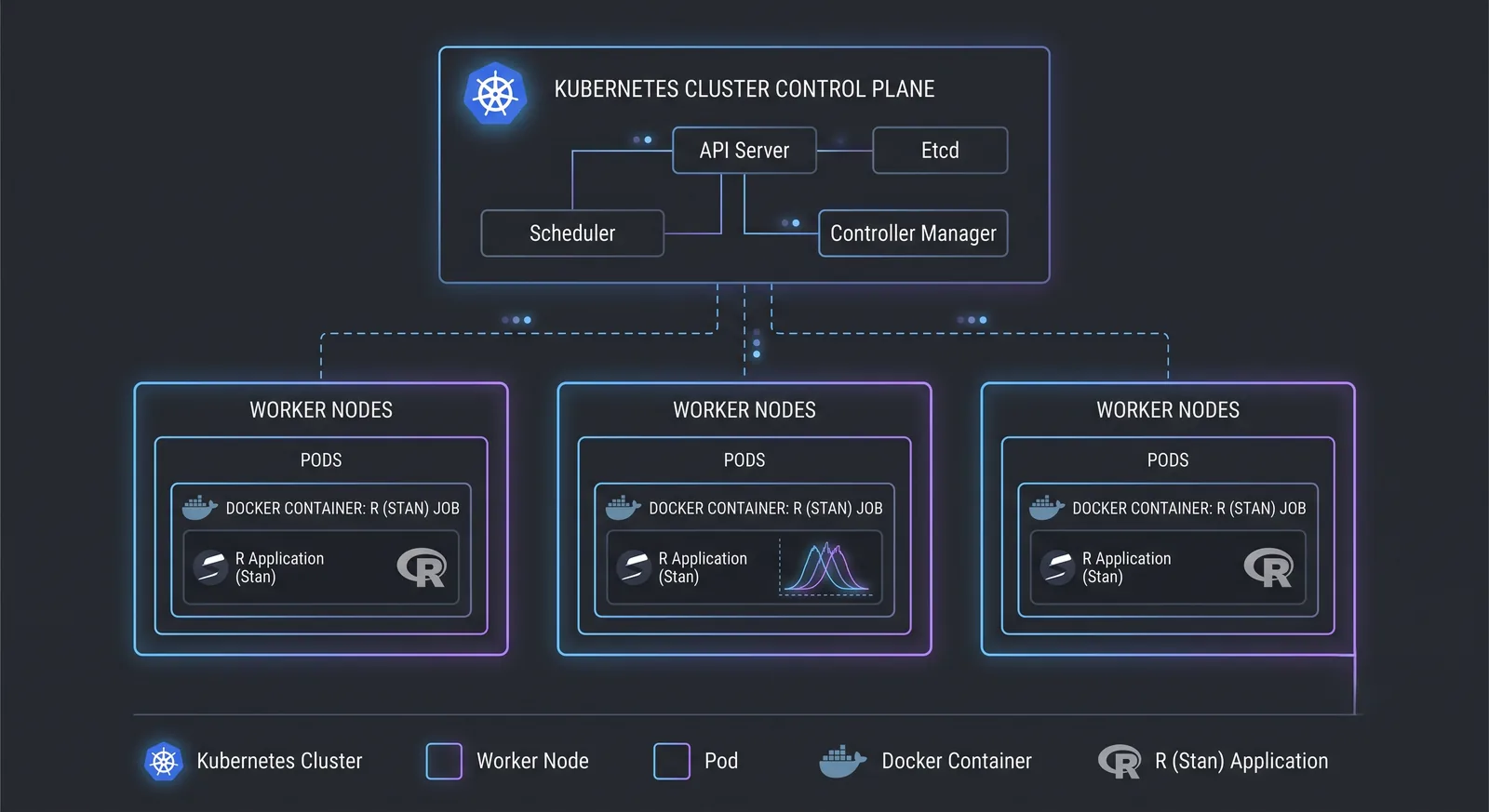
Production environments orchestrate containers through clusters. Kubernetes, for example, whether self-managed or through a managed service such as AWS EKS, can execute many jobs concurrently. Below is a Kubernetes Job specification:
apiVersion: batch/v1
kind: Job
metadata:
  name: r-mcmc-job
spec:
  template:
    spec:
      containers:
      - name: r-mcmc
        image: myregistry/r-mcmc-image:latest
        command: ["Rscript", "model.R"]
        resources:
          limits:
            cpu: "4"
            memory: "8Gi"
      restartPolicy: Never
This Job starts one container on whichever node in the cluster has capacity. Services like AWS EKS scale the number of containers automatically according to load, creating additional pods and worker instances when they are needed. That is what makes it possible to run many independent MCMC jobs in parallel.
Best practices
- Small base images: add only the packages you actually need, so the Docker image stays as small as possible (
rocker/r-baseorrocker/verse, for instance). - Multi-stage builds: if heavy compilation dependencies are only required at build time, drop them from the final image.
- Pinning package versions: lock R package versions with a tool such as
renvorpackratso the environment stays reproducible, and install those packages in the Dockerfile. - Resource limits: set CPU and memory limits per container so that a large MCMC job cannot block the others.
- Persisting data: use a host volume or cloud object storage (S3, for example) for the input data, and volumes or a shared filesystem to retrieve results after the container exits.
Conclusion
Containerising R-based MCMC workflows gives you portable, reproducible deployments, and keeps the environment identical from development through to production. Orchestration then runs many chains or experiments in parallel, making full use of the available CPU and GPU compute. Together this makes statistical workloads far easier to scale and to integrate R analytics into a modern cloud architecture.